
Spark Your Musical Inspiration with a Modern MIDI Keyboard
- Popuglobal
- Knowledge base
Every music producer has experienced this heartbreaking moment: a brilliant melody flashes into your mind, you excitedly fire up your computer and load up your DAW. Yet, when you finally face that blank project file and blinking cursor, most of that initial inspiration has evaporated.
Even if you manage to grab the tail end of that inspiration and try to click it into the piano roll with a mouse, the tedious process is not only frustrating but also kills your workflow. Often, halfway through, you’ve completely forgotten the original groove and vibe. What holds musicians back isn’t a lack of talent or inspiration; it’s the missing bridge that seamlessly connects the brain to the software. A modern MIDI keyboard changes everything.
Contents
The Real Power of Modern MIDI Keyboards
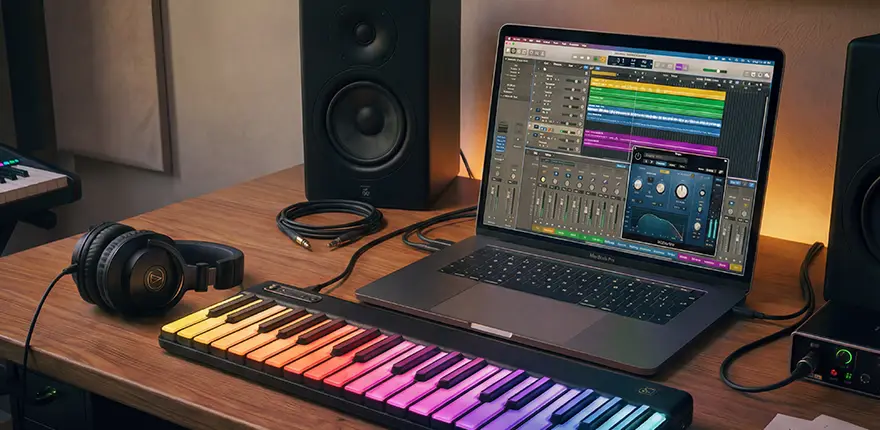
If you haven’t looked at MIDI controllers in a few years, you’ll find they’ve undergone a massive evolution. Today’s keyboards are no longer just clunky plastic with semi-weighted keys; they are intelligent, creative hubs. Here are the core features that are completely disrupting the modern arrangement workflow:
Simply press any single key to automatically generate complex seventh chords or rich rhythmic textures
Continue applying pressure after striking a key to directly trigger vibrato, glissando, or sound filtering
Today’s devices offer truly mouse-free operation with instant mapping and real-time screen synchronization
Tap out your beats using microsecond-latency drum pads inspired by classic hardware samplers
Modern wireless MIDI technology reduces latency to just a few milliseconds—completely below the threshold of human perception.
Unleash your imagination, and you will find stages everywhere. Free yourself from fixed formats and venue restrictions. The moment you take it out, your exclusive party kicks off right away.
The Creative Workflow
Open your favourite piano app and press the record button. Improvise for five minutes without judging yourself. The physical piano keys make it feel like you’re playing, not programming. When you play it back, mark the sections that give you goosebumps—those are the core elements of your song.
Extract the 8-bar loop you’re most satisfied with from your improvisation. Use chord modes to experiment with chord progressions you wouldn’t normally use. Many advanced smart keyboards today feature LED key indicators that light up the notes of a selected scale or chord directly on the keys. This visual feedback, combined with chord modes, allows even creators with limited music theory knowledge to confidently explore complex chord progressions on the keyboard that they might not normally dare to try.
Switch to velocity-sensitive drum pads. Tap out kick and snare patterns with your fingers. Subtle rhythmic nuances, slight pre-beat pushes and laid-back hi-hat strokes infuse MIDI drums with natural human drumming vitality. Set quantization between 70% and 80% instead of full 100%.
Map sliders to synth filter cutoff frequency and knobs to reverb send level. Hit play and record automation in real time. Gradually open the filter during crescendos and boost immersive reverb in the bridge section. Flawless straight lines drawn by mouse can never replicate the emotional and tactile nuances of twisting physical knobs manually.
Play the entire song's structure on a loop, then close your eyes and play it three times in a row. Each time, focus on a different emotional expression. Edit the most exciting parts together. The keyboard makes the editing process feel like playing a piece, not editing.
Map the faders on the keyboard directly to the volume controls of each track. Close your eyes and mix with your ears, not your eyes. While the music plays, use your fingers to feel and fine-tune the fader positions. You’ll make decisions faster and trust your intuition more.
Creative Techniques Beyond the Manual
Record the same chord progression across three different octaves. During mixing, keep the track providing the bass foundation perfectly centered, while panning the midrange track all the way to the far left and the treble track all the way to the far right. Finally, use light compression to blend them together. Without any soundstage-widening plugins, you can instantly create a cinematic, expansive, and bass-heavy epic soundscape in your headphones.
Break conventional rules and map keyboard playing velocity to unexpected synthesizer parameters, such as sample start time, wavetable position and grain density. Every subtle dynamic shift of your fingers will bring delicate timbre transformation.
After recording a satisfying melody, duplicate the MIDI clip onto a new track and apply a completely different instrument tone. Manually offset its playback time by 15 to 35 milliseconds and turn down the volume to around 30%. Based on psychoacoustic principles, this creates a natural ambient layered effect. Unlike harsh traditional echo, it acts like an inseparable shadow and greatly enhances the stereo depth of the main melody.
Most modern MIDI keyboards are equipped with aftertouch. Try assigning it to vibrato intensity, filter cutoff frequency, or volume swells. Now, you no longer need to free up your left hand to turn the modulation wheel. Simply press down hard on the keys as the melody builds toward its climax, and the emotional flow of the phrase will surge freely in response to your physical effort.
Don’t load a drum kit onto your pads; instead, try loading an instrument with fixed pitches, so that each pad triggers a different note. This completely unfamiliar physical layout will forcefully disrupt the muscle memory your brain has built up on the black and white keys. In this awkward exploration, your intuition will often lead you to create strange rhythms and melodies that you would never normally write.
Set up a MIDI loop recording track in your DAW. Without taking your hands off the keyboard, play a chord progression and let it loop automatically. Then, switch the timbre with a single keystroke and overlay a bassline directly onto it. Switch the timbre again and overlay an arpeggio... In this highly focused physical interaction, you can often complete the basic structure of an entire song within ten minutes.
Find a Keyboard That Suits Your Creative Style
MIDI keyboards are not all the same. The most expensive or feature-packed model isn’t necessarily the best fit. In actual production, your workflow’s smoothness often depends on how well the instrument’s sound and feel match your needs. A pricey, 88-key, fully weighted behemoth designed to help Hollywood composers perfectly emulate a symphony orchestra can be a disaster if you try to cram it onto a bedroom producer’s cramped desk.
| Creative Style | Key Count | Essential Features | Why It Works |
|---|---|---|---|
| Music Producer / Beatmaker | 25–36 Keys | Velocity-sensitive pads, Chord mode, Scale lock | Compact and space-saving for desks. Pads handle finger drumming while keys cover basslines and chords. At this stage, workflow speed and efficiency triumph over wide pitch ranges. |
| Songwriter / Vocalist | 49–61 Keys | Arpeggiator, Transport controls, Sustain pedal input | Provides ample range for two-handed playing. Built-in recording and transport controls keep you away from the computer screen, allowing you to seamlessly capture song drafts and maintain creative flow. |
| Electronic Artist / Sound Designer | 37–49 Keys | Assignable knobs & faders, Aftertouch, CV/Gate outputs | Dense knobs deliver precise, hands-on control over synth parameters. Aftertouch adds subtle, expressive dynamics to the tone, perfectly supporting modular hardware synthesizer integration. |
| Film / Game Composer | 61–88 Keys | Fully-weighted or semi-weighted keys, Expression pedal input, Multi-zone key mapping | Offers the full acoustic range necessary for complex orchestral mockups. Weighted keys accurately capture dynamic crescendos, and the lower register can be mapped as keyswitches to change articulation styles instantly. |
| Live Performer | 49–61 Keys | Clip launch matrix, Seamless scene switching, Rugged build | Completely breaks the reliance on laptops, enabling blind operation to trigger clips and effects on stage. A military-grade build ensures it survives the bumps of touring and harsh stage environments. |
| Complete Beginner / Hobbyist | 25–36 Keys | Smart scale/chord mode, Bundled Lite DAW, USB plug-and-play | Extremely low barrier to entry. "Wrong-note-proof" scales and instant musical feedback build playing confidence fast. Included software means you can start creating immediately out of the box without hidden costs. |
Space Dictates Creative Limits
- Keyboard placement: If an instrument requires you to move clutter out of the way, dig out cables, and spend a minute setting it up before you can start playing, your usage rate will instantly drop by 70%. The difference between a properly positioned keyboard and one that makes you feel comfortable is enormous.
- Monitor Placement: The screen should be above the keyboard, not behind it. If you have to lean forward and crane your neck to see the DAW interface while playing, your posture is not a creative posture, but an editing posture. Raise the screen to free your hands and your mind.
- Headphones & Monitor Speakers: Each serves distinct purposes. Headphones excel at detail refinement, capturing subtle velocity variations to infuse vitality into performance. Monitor speakers or open-back headphones are ideal for overall arrangement judgment.
Music Genres That Perfectly Suit a MIDI Keyboard Workflow
Certain musical genres, in particular, have benefited from a compositional approach dominated by keyboards and controllers:
- Rhythm and Soul Genres: Lo-Fi Hip Hop, Neo-Soul, R&B, Jazz Fusion.
- Electronic and Dance Genres: Synthwave, House & Techno, Indie Electronica, Ambient.
- Modern Mainstream and Audiovisual Genres: Pop Production, Drill / Trap, Movie Trailer Scores, Video Game Soundtracks (OST).
These music genres emphasize human feelings, subtle rhythmic variations, dynamic changes, and expressive modulations, which are almost impossible to achieve with mouse programming, but can be easily done with a physical keyboard and controls.
FAQ
Do I need to know how to play the piano to use a MIDI keyboard?
Not at all. Modern MIDI keyboards feature scale locking and chord modes, allowing you to play the correct notes with just one finger.
How many keys do I actually need?
For most music producers, 37–49 keys is the best choice.
Is Bluetooth MIDI reliable enough for music production?
Yes. The current generation of Bluetooth MIDI (BLE 5.0+) has a latency of 5–10 milliseconds, which is virtually negligible for most music production tasks.
What is the difference between a MIDI keyboard and a synthesizer?
A MIDI keyboard does not produce sound on its own. It simply sends notes and control data to a computer, which then triggers software instruments to generate sound.
Which software programs are compatible with MIDI keyboards?
Virtually all software supports them. Ableton Live, Logic Pro, FL Studio, Cubase, Reason, Bitwig, Studio One, GarageBand, and Reaper all natively support MIDI keyboards.